

解决使用pjax功能后前进后退导致出现多个“ap 播放器”
9个月前 博主对js实在是不懂,也就会瞎几把穷举,如果穷举不出就GG了,通过一顿猛...

这款js弹窗气泡代码非常简约,能够胜任日常弹窗业务。
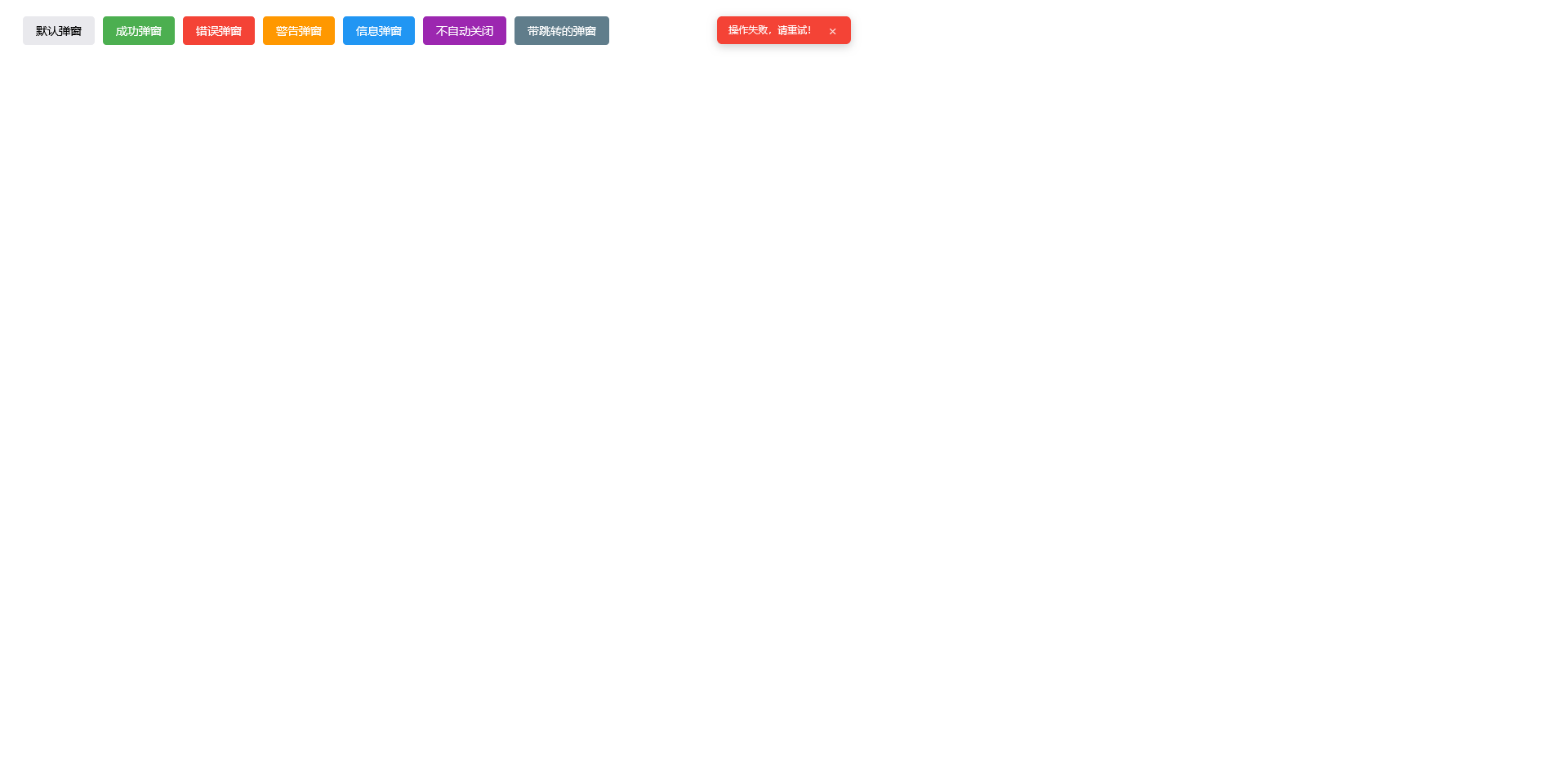
<!DOCTYPE html><br />
<html lang="zh-CN"><br />
<head><br />
<meta charset="UTF-8"><br />
<meta name="viewport" content="width=device-width, initial-scale=1.0"><br />
<title>原生JS弹窗气泡</title><br />
<style><br />
/* 弹窗气泡样式 - 顶部居中显示 */<br />
.popup-bubble {<br />
position: fixed;<br />
padding: 8px 14px;<br />
border-radius: 6px;<br />
background-color: #333;<br />
color: white;<br />
font-family: Arial, sans-serif;<br />
font-size: 12px;<br />
box-shadow: 0 3px 10px rgba(0, 0, 0, 0.2);<br />
z-index: 9999;<br />
opacity: 0;<br />
transition: opacity 0.3s ease, transform 0.3s ease;<br />
pointer-events: auto;<br />
/* 顶部居中显示 */<br />
top: 20px;<br />
left: 50%;<br />
transform: translateX(-50%) translateY(-20px);<br />
}<br />
<br />
/* 气泡出现的动画 */<br />
.popup-bubble.show {<br />
opacity: 1;<br />
transform: translateX(-50%) translateY(0);<br />
}<br />
<br />
/* 不同类型的气泡样式 */<br />
.popup-bubble.success {<br />
background-color: #4CAF50;<br />
}<br />
<br />
.popup-bubble.error {<br />
background-color: #f44336;<br />
}<br />
<br />
.popup-bubble.warning {<br />
background-color: #ff9800;<br />
}<br />
<br />
.popup-bubble.info {<br />
background-color: #2196F3;<br />
}<br />
<br />
/* 关闭按钮样式 */<br />
.popup-bubble .close-btn {<br />
position: relative;<br />
display: inline-block;<br />
vertical-align: middle;<br />
margin-left: 8px;<br />
color: rgba(255, 255, 255, 0.8);<br />
background: none;<br />
border: none;<br />
cursor: pointer;<br />
font-size: 14px;<br />
width: 16px;<br />
height: 16px;<br />
padding: 0;<br />
line-height: 1;<br />
transition: background-color 0.2s;<br />
border-radius: 50%;<br />
}<br />
<br />
.popup-bubble .close-btn:hover {<br />
background-color: rgba(255, 255, 255, 0.2);<br />
}<br />
<br />
/* 测试按钮样式 */<br />
.test-buttons {<br />
margin: 20px;<br />
display: flex;<br />
gap: 10px;<br />
flex-wrap: wrap;<br />
}<br />
<br />
.test-btn {<br />
padding: 8px 16px;<br />
border: none;<br />
border-radius: 4px;<br />
cursor: pointer;<br />
font-size: 14px;<br />
transition: opacity 0.2s;<br />
}<br />
<br />
.test-btn:hover {<br />
opacity: 0.9;<br />
}<br />
</style><br />
</head><br />
<body><br />
<div class="test-buttons"><br />
<button class="test-btn" onclick="showPopup('默认提示信息')">默认弹窗</button><br />
<button class="test-btn" style="background-color: #4CAF50; color: white" onclick="showPopup('操作成功!', 'success')">成功弹窗</button><br />
<button class="test-btn" style="background-color: #f44336; color: white" onclick="showPopup('操作失败,请重试!', 'error')">错误弹窗</button><br />
<button class="test-btn" style="background-color: #ff9800; color: white" onclick="showPopup('请注意,这是一个警告!', 'warning')">警告弹窗</button><br />
<button class="test-btn" style="background-color: #2196F3; color: white" onclick="showPopup('这是一条信息提示', 'info')">信息弹窗</button><br />
<button class="test-btn" style="background-color: #9C27B0; color: white" onclick="showPopup('这个弹窗不会自动关闭', 'info', false)">不自动关闭</button><br />
<button class="test-btn" style="background-color: #607D8B; color: white" onclick="showPopup('3秒后跳转到百度', 'info', true, 3000, 'https://www.baidu.com')">带跳转的弹窗</button><br />
</div><br />
<br />
<script><br />
/**<br />
* 显示弹窗气泡<br />
* @param {string} message - 弹窗消息内容<br />
* @param {string} type - 弹窗类型:success, error, warning, info (默认值:无)<br />
* @param {boolean} autoClose - 是否自动关闭 (默认值:true)<br />
* @param {number} duration - 自动关闭延迟时间(毫秒) (默认值:3000)<br />
* @param {string} url - 弹窗关闭后跳转的URL (默认值:null,不跳转)<br />
* @param {number} redirectDelay - 弹窗关闭后延迟多久跳转(毫秒) (默认值:500)<br />
*/<br />
function showPopup(<br />
message, <br />
type = '', <br />
autoClose = true, <br />
duration = 3000, <br />
url = null, <br />
redirectDelay = 500<br />
) {<br />
// 创建弹窗元素<br />
const bubble = document.createElement('div');<br />
bubble.className = `popup-bubble ${type}`;<br />
<br />
// 存储跳转相关参数<br />
bubble.redirectUrl = url;<br />
bubble.redirectDelay = redirectDelay;<br />
<br />
// 设置弹窗内容<br />
bubble.innerHTML = `<br />
<span class="popup-message">${message}</span><br />
<button class="close-btn">×</button><br />
`;<br />
<br />
// 添加到页面<br />
document.body.appendChild(bubble);<br />
<br />
// 触发显示动画<br />
setTimeout(() => {<br />
bubble.classList.add('show');<br />
}, 10);<br />
<br />
// 关闭按钮事件<br />
const closeBtn = bubble.querySelector('.close-btn');<br />
closeBtn.addEventListener('click', () => {<br />
closePopup(bubble);<br />
});<br />
<br />
// 自动关闭<br />
if (autoClose) {<br />
bubble.closeTimer = setTimeout(() => {<br />
closePopup(bubble);<br />
}, duration);<br />
}<br />
}<br />
<br />
/**<br />
* 关闭弹窗<br />
* @param {HTMLElement} bubble - 弹窗元素<br />
*/<br />
function closePopup(bubble) {<br />
// 清除定时器<br />
if (bubble.closeTimer) {<br />
clearTimeout(bubble.closeTimer);<br />
}<br />
<br />
// 移除显示类,触发淡出动画<br />
bubble.classList.remove('show');<br />
<br />
// 动画结束后移除元素<br />
setTimeout(() => {<br />
if (bubble.parentNode) {<br />
bubble.parentNode.removeChild(bubble);<br />
}<br />
<br />
// 如果有URL参数,则延迟跳转<br />
if (bubble.redirectUrl) {<br />
setTimeout(() => {<br />
window.location.href = bubble.redirectUrl;<br />
}, bubble.redirectDelay);<br />
}<br />
}, 300);<br />
}<br />
<br />
// 页面加载完成后显示一个欢迎弹窗<br />
window.addEventListener('load', () => {<br />
showPopup('欢迎使用弹窗气泡组件!', 'info');<br />
});<br />
</script><br />
</body><br />
</html><br />
<br />
```<br />#免责声明#
本文为转载 或 原创内容,未经授权禁止转载、摘编、复制及镜像使用、转载请注明作者、出处及原文链接、违者将依法追究责任。
9个月前 博主对js实在是不懂,也就会瞎几把穷举,如果穷举不出就GG了,通过一顿猛...

10个月前 以前都没有用过这个功能,近期在搞一个东东遇到了这个问题,怎么实现分...

10个月前 > 有的时候想要文章中链接地址点击后跳转到一个中转页面,可以通过下面...
10个月前 说起我的磨至今也有二十几年,很久没有人管理了,现在虽然偶尔还能访问...
9个月前 博主在制作主题的时候遇到开启pjax功能后,在文章中进行评论会出现无法评...
9个月前 > 需求说明 以前还真没有注意这个问题,今天一位朋友测试上一篇文章的...